Contributing
PHP checks
Use PHP 8.5+ and the locked CakePHP 6 development build. Enable PDO SQLite for the association integration tests. They use an in-memory database to verify choice queries and CakePHP entity marshalling.
composer install
composer check
composer test-coverage
composer check runs PHPUnit, Mago analysis and linting using the CakePHP preset, a Rector dry run, and Mago format checks. CI runs the same command and fails when Rector proposes changes.
composer format applies formatting; composer lint-fix applies safe lint fixes. composer rector previews refactorings without changing files. Run composer rector-fix to apply refactorings and then format with Mago. Review the diff and rerun composer check and composer test-coverage before submitting it.
When upgrading CakePHP, verify the form-protection integration against the supported matrix: it uses CakePHP's internal FormProtector API.
Coverage requires Xdebug coverage mode or PCOV. All production PHP is included, with a gate enforcing strictly greater than 90% line coverage. CI uploads the Clover report to Codecov using GitHub OIDC. Upload errors are nonblocking; the local coverage gate remains mandatory. Codecov must have the repository enabled to populate its coverage badge.
Browser and HTTP regressions
After composer install, install the development-only browser tooling:
npm ci
npx playwright install chromium
npm run test:browser
On Linux CI, use npx playwright install --with-deps chromium to install the browser's system libraries too. The suite starts a local PHP server on port 8765 and tests native constraint validation, actual FormData, ID associations, native summary-link navigation, and multipart submissions through CakePHP's CSRF middleware and FormProtectionComponent. It also checks rejection of extra fields, altered locked values, and missing CSRF tokens. CI runs this as a separate test job. Browser tooling is not a runtime dependency of the plugin or rendered forms.
Documentation site
The site uses a pinned VitePress 2 preview. Use Node.js 22.12 or later:
npm ci
npm run docs:dev
Build and preview the published output with:
npm run docs:build
npm run docs:preview
The build checks internal links. Documentation changes build on pull requests and deploy to GitHub Pages from main. Keep generated output and installed Node dependencies out of commits.
Page metadata
Give every documentation page a unique title and description in its YAML frontmatter. Keep the homepage title and hero explicit about CakePHP. Ordinary page titles receive the FormCompose suffix; the homepage sets titleTemplate: false to use its complete title directly.
The VitePress configuration generates canonical URLs, Open Graph and Twitter metadata, and a sitemap for https://josbeir.github.io/cakephp-form-compose/. Page metadata also updates during client-side navigation. Keep the public hostname and repository base path aligned when changing hosting, and preserve existing .html URLs. The generated 404 page is marked noindex. The public asset directory is excluded from page discovery so asset documentation does not become a reader-facing page or sitemap entry.
The SVG logo is the favicon; its PNG export supplies the social sharing image. Verify the built HTML and sitemap.xml when changing metadata configuration.
Documentation structure
The site teaches CakePHP developers who are new to FormCompose. Keep the homepage short and connect a control call to its PHP element before detailed setup.
Source directories mirror the sidebar groups. Keep docs/index.md as the homepage; put other pages in the section that owns the topic:
| Sidebar section | Source directory | Content |
|---|---|---|
| Start here | docs/start-here/ | The problem, first form, and migration. Keep optional configuration out of the first form. |
| Build your forms | docs/forms/ | Focused recipes for fields, search, uploads, choices, associations, summaries, actions, custom controls, and introductory blueprints. |
| Markup and styling | docs/markup/ | The rendering model, field parts, templates, themes, variants, and template debugging. |
| Reusable forms | docs/reusable-forms/ | Reusable configuration, blueprint composition, nested layouts, and repeated embeds. The introductory blueprint recipe lives in Build your forms. |
| API reference | docs/reference/ | Complete signatures, return values, options, defaults, precedence, and failure contracts. |
| Advanced and project | docs/advanced/ | Service extensions, blueprint injection/discovery, and contributor setup. |
Guides link to the reference for complete contracts rather than repeating its tables. Keep configuration, resolved state, and rendering responsibilities clear.
Source paths and published URLs
VitePress rewrites in docs/.vitepress/config.ts map these source paths to the existing public routes. For example, docs/markup/variants.md is still published at /variants.html. Internal links use published routes such as /variants#layers-take-priority-before-specificity, independently of the source directory. VitePress adds the repository base path and .html extension.
When adding a page, put it in the matching directory, add its rewrite, and add its sidebar entry. When moving a page, update its rewrite's source path and keep the destination stable. GitHub edit links use the actual source file path.
Use an article form for the introduction and focused examples for other tasks. Start with a concrete goal, show the working files, and explain the result before adding variations. Keep API contracts in the reference; remove repeated prose. Label file tabs, include imports, and explain which application variables are assumed. Say whether tabs are required files or alternative approaches.
Use built-in VitePress features selectively: code groups for connected examples, line highlights for the setting being introduced, callouts for actionable caveats, and details blocks for optional expansions. Required setup stays visible. Short snippets do not need line numbers. Follow the formatting conventions in AGENTS.md.
Check examples against implementation and behavior tests. Documentation-only changes need content/example review, npm ci, and npm run docs:build; they do not require the production PHP quality workflow.
Binding and rendering architecture
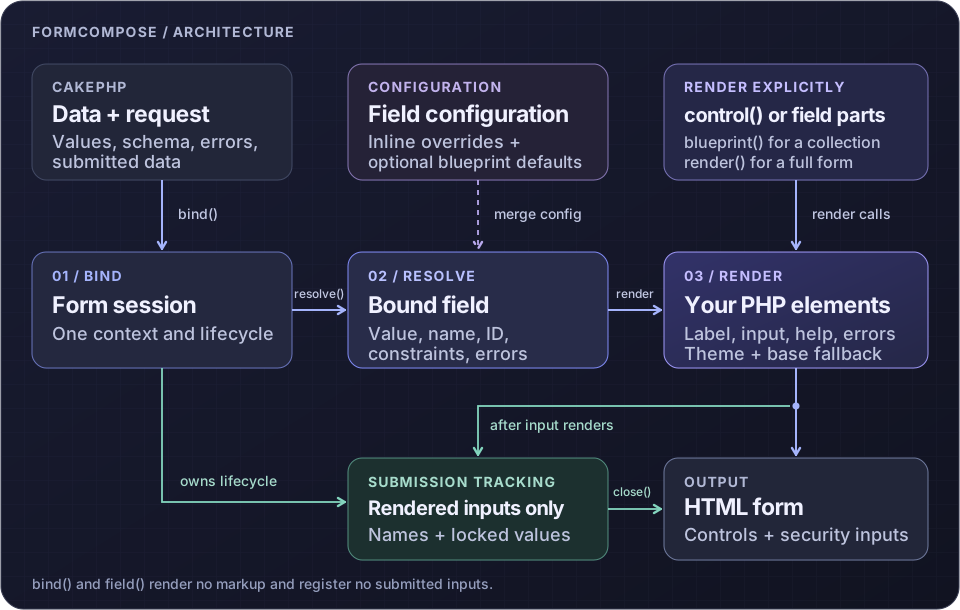
For contributors working on the lifecycle, this diagram shows how configuration, field resolution, rendering, and submission registration connect: