

Commands #
Glaze ships with a small CLI that covers the full workflow.
The command is exposed as a Composer binary, so the preferred invocation is glaze ....
General help #
glaze --help
If you are running from source, these work too:
php bin/glaze --help
./bin/glaze --help
init #
Create a new Glaze project scaffold.
glaze init my-site
Useful options:
-
--name -
--title -
--page-template -
--description -
--base-url -
--base-path(for subfolder deployments, for example/blog) -
--taxonomies -
--preset <name|path>(scaffold preset to use; defaults todefault; built-in values:default,vite; or a path to a custom preset directory) -
--force -
--yes(non-interactive)
Example:
glaze init my-site \
  --title "My Site" \
  --page-template "landing" \
  --description "Small notes and experiments" \
  --base-path "/blog" \
  --preset vite \
  --taxonomies tags,categories \
  --yes
Path to a custom preset directory:
glaze init my-site --preset ./my-company-preset --yes
See Scaffold presets for details on creating custom presets.
build #
Generate static output from content/ + templates/.
Build also copies:
-
non-Djot assets from
content/to matching paths inpublic/ -
all files from
static/topublic/root
glaze build
Options:
-
--root <path>project root -
--cleanforce cleaning the output directory before build -
--draftsinclude draft pages -
--viterun Vite build process after static build -
--vite-command <command>custom Vite build command (defaults tobuild.vite.commandornpm run build)
Defaults for these options can be set in glaze.neon under build (clean, drafts, vite.enabled, vite.command).
Incremental builds are the default. Use --clean for a one-off clean run, or set build.clean: true in glaze.neon to always clean before building.
With --verbose, build output streams one line per page during the build:
-
generated ... (n/total) 0.42s— page rendered and written -
cached ... (n/total)— page unchanged and reused from previous build output -
virtual ... (n/total)— extension-injected virtual page (for examplesitemap.xml)
Vite build example:
glaze build --vite
glaze build --vite --vite-command "pnpm build"
new #
Create a new Djot content page with frontmatter.
glaze new
Interactive prompts ask for:
- title
- type (only shown when contentTypes are configured)
- date (defaults to current time)
-
create post folder (
index.dj) or single file (my-title.dj) - draft (yes/no)
Options:
-
--root <path>project root -
--title <title>page title (also available as positional argument) -
--slug <slug>explicit page slug/path -
--path <path>optional subfolder path prefix undercontent/ -
--date <date>date/datetime parseable by Chronos -
--weight <int>optional page sort weight (lower values sort first) -
--type <type>content type name (required whencontentTypesare configured) -
--draftmark page as draft -
--indexcreate page asfolder/index.djinstead offile.dj -
--forceoverwrite existing target file -
--lang <code>target the content directory configured for this language code (requires i18n to be enabled) -
--yesnon-interactive mode
Examples:
# interactive
glaze new

# fully non-interactive
glaze new "Post title" --date "2026-02-24T14:30:00+01:00" --weight 10 --type blog --draft --yes

# create under a subfolder path
glaze new "Post title" --path "posts/2026" --yes

# smart placement from type path rule (for example `contentTypes.blog.paths[0].match: posts`)
glaze new "Post title" --type blog --yes

# when a type has multiple path rules, select one with --path (must match a `match` value)
glaze new "Post title" --type blog --path posts --yes

# create a bundle-style page with index.dj
glaze new "Post title" --path "blog" --index --yes

# create a page in the nl language content directory (requires i18n)
glaze new "Mijn bericht" --lang nl --yes
serve #
Run local web server for development.
glaze serve
Options:
-
--root <path> -
--host <host>(default127.0.0.1) -
--port <port>(default8080) -
--staticserve prebuiltpublic/ -
--buildprebuild before static serve (--staticrequired) -
--draftsinclude drafts for static mode -
--viteenable Vite integration in live mode -
--vite-host <host>Vite host (default127.0.0.1) -
--vite-port <port>Vite port (default5173) -
--vite-command <command>custom Vite command ({host}and{port}placeholders supported)
Examples:
# live mode (templates/content)
glaze serve

# static preview after build
glaze serve --static --build

# live mode + Vite
glaze serve --vite

# live mode + custom Vite command
glaze serve --vite --vite-command "pnpm dev --host {host} --port {port}"
Using Vite #
Vite integration is available in live mode and starts your Vite dev process alongside glaze serve.
Prerequisites:
-
A valid Vite setup in your project root (for example
vite.config.js/vite.config.ts). -
A package manager script that starts Vite (for example
npm run dev). - Template/layout code that references your Vite dev assets while developing.
For a quick start, scaffold Vite files and defaults with:
glaze init my-site --preset vite
Basic usage:
glaze serve --vite
Common customizations:
glaze serve --vite --vite-host 0.0.0.0 --vite-port 5173
glaze serve --vite --vite-command "npm run dev -- --host {host} --port {port} --strictPort"
You can also set defaults in glaze.neon:
devServer:
  vite:
    enabled: false
    host: 127.0.0.1
    port: 5173
    command: "npm run dev -- --host {host} --port {port} --strictPort"
Notes:
-
Vite integration is for live mode only (
--vitecannot be used with--static). -
CLI options override
glaze.neonvalues. -
{host}and{port}placeholders invite.commandare replaced at runtime. -
If your configured command cannot start (missing script/config/dependencies),
glaze serveexits with an error.
routes #
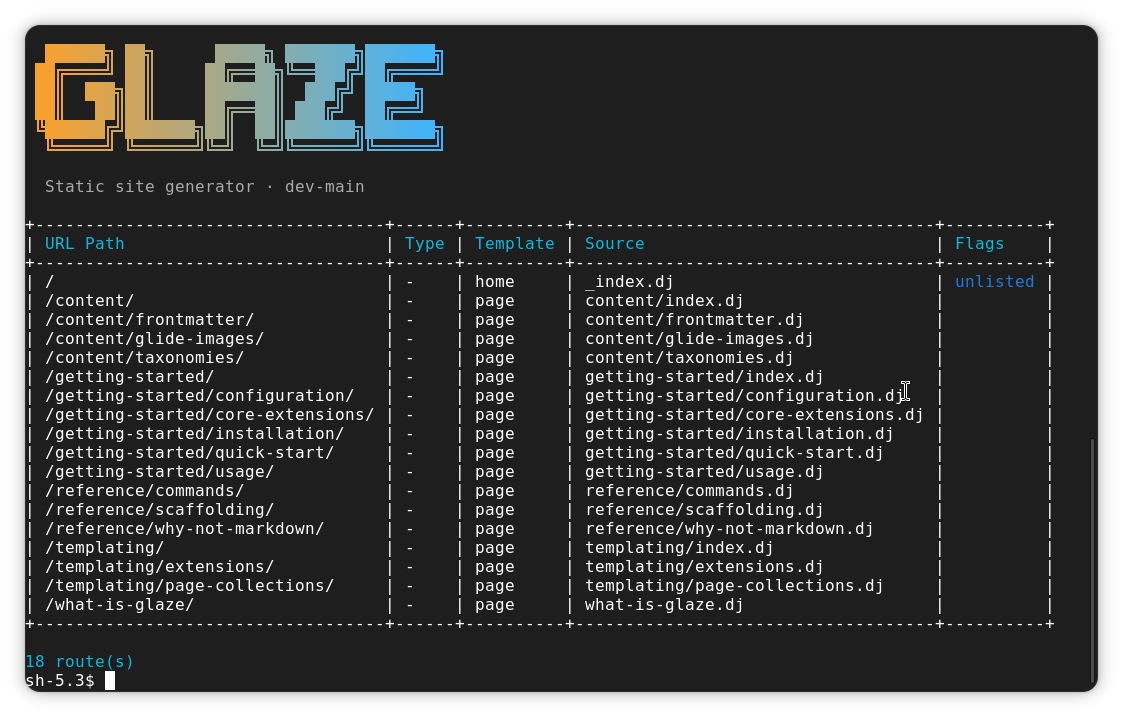
List all discovered content routes without running a full build.
Outputs a table of every URL that would be generated from content/, including
taxonomy index pages. Virtual routes added by extensions (sitemap, RSS, llms.txt)
are not included since extensions are not invoked.
glaze routes
Options:
-
--root <path>project root -
--type <types>filter by content type; accepts comma-separated values (for examplepost,note) -
--taxonomy <filters>filter by taxonomy; acceptskey(any value) orkey=value; comma-separated for multiple (for exampletag=php,category=tutorial) -
--lang <codes>filter by language code; accepts comma-separated values (for examplenl,fr); only applies to i18n-enabled sites -
--truncate <n>truncate cell values tonvisible characters (default60;0disables) -
--draftsinclude draft pages
Examples:
# all routes
glaze routes

# filter by a single type
glaze routes --type post

# filter by multiple types
glaze routes --type post,note

# filter by taxonomy key (any value present)
glaze routes --taxonomy tag

# filter by taxonomy key=value
glaze routes --taxonomy tag=php

# combine type and taxonomy filters, show full paths without truncation
glaze routes --type post --taxonomy tag=php --truncate 0

# include draft pages
glaze routes --drafts

# show only Dutch routes (i18n sites)
glaze routes --lang nl

# show English and French routes
glaze routes --lang en,fr
Column reference:
- URL Path — public URL of the page
- Language — language code of the page; only shown for i18n-enabled sites
-
Type — content type name, or
-when untyped -
Template — effective Sugar template name resolved from frontmatter or
build.pageTemplate -
Source — source file path relative to the language content directory, or
-for taxonomy-generated pages -
Flags —
draftand/orunlistedwhen applicable
cc #
Clear the compiled Sugar template cache and/or the Glide image transformation cache.
By default both caches are cleared. Run this whenever you change Vite or template configuration and the rendered output does not reflect your changes.
When clearing both caches (no flags), Glaze also clears the incremental build manifest
(tmp/cache/build-manifest.json).
glaze cc
Options:
-
--root <path>project root -
--templatesclear only the compiled Sugar template cache (tmp/cache/sugar) -
--imagesclear only the Glide image cache (tmp/cache/glide)
Examples:
# clear everything
glaze cc

# clear template cache only
glaze cc --templates

# clear image cache only
glaze cc --images
Typical workflow #
-
init(once) -
serveduring development -
routesto inspect discovered routes -
ccto clear caches when changing configuration -
buildfor deployment artifacts