
Engine Configuration
Configure the engine once and keep the rest of your templates clean. Most teams only need a custom prefix, loader paths, and a cache directory.
TIP
Build your engine from a single SugarConfig instance so loaders, parser, and compiler share the same configuration.
Engine Configuration
Use the builder to configure loaders, cache, and debug mode in one place:
use Sugar\Engine;
use Sugar\Cache\FileCache;
use Sugar\Loader\FileTemplateLoader;
use Sugar\Config\SugarConfig;

$config = SugarConfig::withPrefix('x');

$engine = Engine::builder($config)
    ->withTemplateLoader(new FileTemplateLoader(
        config: $config,
        templatePaths: [__DIR__ . '/templates'],
        componentPaths: ['components']
    ))
    ->withCache(new FileCache(__DIR__ . '/cache/templates'))
    ->withDebug(true)
    ->build();
INFO
withDebug(true) enables file timestamp checks for development. Disable it in production for best performance.
Optional PHP Syntax Validation
Sugar can run optional parser-based PHP syntax validation during compilation for earlier diagnostics.
use Sugar\Engine;

$engine = Engine::builder()
    ->withTemplateLoader($loader)
    ->withDebug(true)
    ->withPhpSyntaxValidation(true)
->build();- Requires
nikic/php-parser(optional dependency). - Validation runs only when debug mode is enabled.
- When disabled (or when debug is off), Sugar relies on runtime PHP parse errors and wraps them as
CompilationException.
TIP
Use syntax validation in local development for faster feedback, then keep it off in production.
Exception Rendering
Sugar ships with a custom HTML exception renderer that produces a polished, themed error view. It is optional and can be enabled with withHtmlExceptionRenderer() or by manually calling withExceptionRenderer(). It highlights the failing template lines, shows line/column context, and includes the message, location, and stack trace in a readable layout.
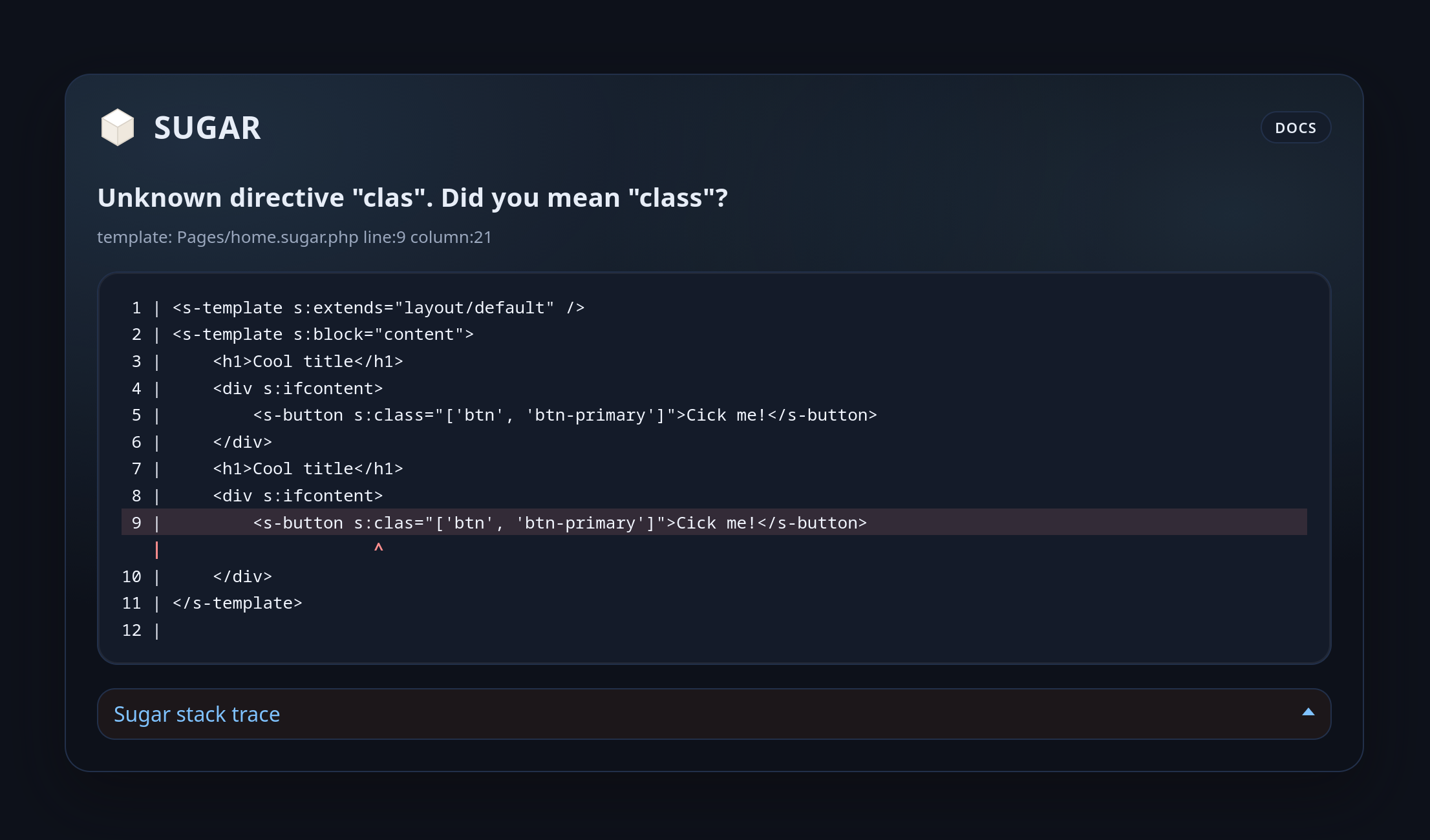
The renderer uses the template loader to fetch the source.
Consecutive identical stack frames are automatically collapsed in the rendered trace to reduce recursion noise.
use Sugar\Engine;
use Sugar\Exception\Renderer\HtmlTemplateExceptionRenderer;
use Sugar\Loader\FileTemplateLoader;
use Sugar\Config\SugarConfig;

$config = new SugarConfig();
$loader = new FileTemplateLoader(
	config: $config,
	templatePaths: [__DIR__ . '/templates'],
);

$engine = Engine::builder($config)
	->withTemplateLoader($loader)
	->withHtmlExceptionRenderer(includeStyles: true, wrapDocument: false)
	->withDebug(true)
	->build();
withHtmlExceptionRenderer() accepts the same rendering toggles as the renderer constructor:
includeStyles: Include inline CSS in the output.wrapDocument: Wrap the output in a full HTML document.
Use withExceptionRenderer() when you need custom renderer options:
use Sugar\Exception\Renderer\HtmlTemplateExceptionRenderer;

$renderer = new HtmlTemplateExceptionRenderer(
	loader: $loader,
	includeStyles: true,
	wrapDocument: false,
	traceMaxFrames: 20,
	traceIncludeArguments: false,
	traceArgumentMaxLength: 80,
	traceIncludeInternalFrames: false,
);includeStyles: Toggle the inline CSS theme. Set tofalseif you want to provide your own styles.wrapDocument: Wrap the output in a full HTML document (<!doctype html>,html,body). Useful when you return the renderer output directly as a response body.traceMaxFrames: Maximum number of stack frames shown (0means unlimited).traceIncludeArguments: Include function arguments in each trace frame.traceArgumentMaxLength: Max string length per rendered argument.traceIncludeInternalFrames: Include frames without file/line metadata.
TIP
Exception rendering only applies when debug mode is enabled and a CompilationException is thrown during rendering. In production, disable debug mode and handle exceptions with standard error pages.
Custom Directive Prefix
Swap the s: prefix if you need to avoid collisions with another templating system:
use Sugar\Config\SugarConfig;

$config = SugarConfig::withPrefix('v');
TIP
After changing the prefix, use it consistently in templates and component tags.
Custom Self-Closing Tags
Sugar treats HTML void elements as self-closing automatically. If you need to add or override the list (for custom tags, SVG-like tags, or HTML subsets), provide a custom list on the config:
use Sugar\Config\SugarConfig;

$config = (new SugarConfig())
    ->withSelfClosingTags([
        'meta',
        'link',
        'custom',
]);use Sugar\Config\SugarConfig;
$config = (new SugarConfig())
->withSelfClosingTags([
...SugarConfig::DEFAULT_SELF_CLOSING_TAGS,
'custom',
'svg',
]);Custom Template Suffix
Sugar defaults to .sugar.php for template filenames. If your project uses a different suffix, override it once on the config:
use Sugar\Config\SugarConfig;

$config = (new SugarConfig())
    ->withFileSuffix('.sugar.tpl');
TIP
Use the same SugarConfig instance for loaders and the engine so template lookups and component discovery stay consistent.
Custom Fragment Element
Override the fragment tag name when you need a different wrapperless element in templates:
use Sugar\Config\SugarConfig;

$config = (new SugarConfig())
->withFragmentElement('s-fragment');<s-fragment s:if="$hasCoffee">
<p>Debug mode is powered by caffeine and hope.</p>
</s-fragment>Template Context
Template context lets you expose helper methods to every template via $this.
TIP
Treat the context as a lightweight helper object. Keep it stateless when possible.
use Sugar\Engine;

$viewContext = new class {
    public function url(string $path): string
    {
        return '/app' . $path;
    }
};

$engine = Engine::builder()
    ->withTemplateLoader($loader)
    ->withTemplateContext($viewContext)
    ->build();
In templates:
<a href="<?= $this->url('/profile') ?>">Profile</a>Common Patterns
$viewContext = new class {
    public function url(string $path): string
    {
        return '/app' . $path;
    }

    public function asset(string $path): string
    {
        return '/assets/' . ltrim($path, '/');
    }
};<link rel="stylesheet" href="<?= $this->asset('app.css') ?>">Details
When to use template context
- Shared helpers like URL or asset builders
- Formatting helpers (dates, numbers) reused across templates
- Framework integration points that should not be global functions
Custom Directive Registry
Register only the directives you want to allow in a given environment:
use Sugar\Extension\DirectiveRegistry;
use Sugar\Directive\IfDirective;
use Sugar\Directive\ForeachDirective;
use Sugar\Directive\CustomDirective;

$registry = DirectiveRegistry::empty();
$registry->register('if', IfDirective::class);
$registry->register('foreach', ForeachDirective::class);
$registry->register('custom', CustomDirective::class);
For directive design details, see Custom Directives.
Details
When to customize the directive registry
- Reduce surface area in locked-down environments
- Add project-specific directives
- Provide feature flags by swapping registries
Extensions
For reusable, shareable features, register extensions on the engine builder. Extensions can bundle directives and compiler passes for clean, modular composition.
use Sugar\Engine;

$engine = Engine::builder()
    ->withTemplateLoader($loader)
    ->withExtension(new UiExtension())
    ->build();
See Creating Extensions for the full extension workflow.
Template Loaders
Template loaders decide how Sugar resolves templates and components. Use file-based loaders for production and string-based loaders for tests or dynamic templates.
TIP
Keep template paths and component paths in one place so your engine configuration stays predictable across environments.
FileTemplateLoader
Use the filesystem for template resolution. templatePaths can be a single path or a list of paths.
use Sugar\Loader\FileTemplateLoader;
use Sugar\Config\SugarConfig;

$loader = new FileTemplateLoader(
    config: new SugarConfig(),
    templatePaths: __DIR__ . '/templates',
    componentPaths: 'components'
);$loader = new FileTemplateLoader(
config: new SugarConfig(),
templatePaths: [
__DIR__ . '/templates',
__DIR__ . '/vendor/package/templates',
],
componentPaths: 'components'
);TIP
If you want template lookups to ignore the current template path, enable absolutePathsOnly: true. This enforces root-style paths like layouts/base.sugar.php and avoids ../ segments.
use Sugar\Loader\FileTemplateLoader;
use Sugar\Config\SugarConfig;

$loader = new FileTemplateLoader(
    config: new SugarConfig(),
    templatePaths: __DIR__ . '/templates',
    componentPaths: 'components',
    absolutePathsOnly: true
);
StringTemplateLoader
Use in-memory templates for tests, demos, or dynamic content.
use Sugar\Loader\StringTemplateLoader;
use Sugar\Config\SugarConfig;

$loader = new StringTemplateLoader(
    config: new SugarConfig(),
    templates: [
        'email/welcome' => '<h1>Welcome <?= $name ?>!</h1>',
    ],
    components: [
        'button' => '<button class="btn"><?= $slot ?></button>',
    ],
    absolutePathsOnly: true
);
Details
When to use each loader
FileTemplateLoaderfor real applications and cachingStringTemplateLoaderfor tests, previews, or isolated render calls
Caching
Sugar includes a file-based cache with dependency tracking and cascade invalidation.
INFO
Caching compiles templates once and reuses the generated PHP for fast renders.
FileCache with Dependency Tracking
Use the default file cache for most applications:
use Sugar\Engine;
use Sugar\Cache\FileCache;
use Sugar\Loader\FileTemplateLoader;
use Sugar\Config\SugarConfig;

$cache = new FileCache(__DIR__ . '/cache/templates');

$engine = Engine::builder()
    ->withTemplateLoader(new FileTemplateLoader(
        config: new SugarConfig(),
        templatePaths: __DIR__ . '/templates'
    ))
    ->withCache($cache)
    ->build();
TIP
Place the cache directory outside your templates folder and ensure it is writable by PHP.
Debug vs Production
Debug mode checks file timestamps on every render. Production mode assumes cached templates are fresh.
$engine = Engine::builder()
    ->withTemplateLoader($loader)
    ->withCache($cache)
    ->withDebug(true)
->build();$engine = Engine::builder()
->withTemplateLoader($loader)
->withCache($cache)
->withDebug(false)
->build();WARNING
Disable debug mode in production to avoid repeated filesystem checks.
Debug Mode
Debug mode enables development-focused diagnostics and safe cache invalidation checks. It is designed for development and should be disabled in production.
TIP
Turn on debug mode when you are inspecting compiled templates or troubleshooting template output.
INFO
When you toggle debug mode, Sugar recompiles templates so cache artifacts always match the selected mode.
Enable Debug Mode
Enable debug mode during local development:
$engine = Engine::builder()
    ->withTemplateLoader($loader)
    ->withDebug(true)
    ->build();
What You Get
- Better error location metadata during compile/runtime failures.
- Optional parser-based syntax diagnostics when
withPhpSyntaxValidation(true)is enabled. - Cleaner interaction with the HTML exception renderer when configured.
- Cache behavior tuned for iterative template development.
WARNING
Disable debug mode in production to avoid extra filesystem checks.
AST Reference
Learn how Sugar represents templates internally and what each node type means.
Helper Reference
A quick tour of helper utilities you can use in custom passes.