Exceptions
Sugar throws focused exceptions that include location metadata so you can identify where a template failed. These exceptions are designed to be actionable during development and safe to log in production.
TIP
Most template errors are SugarException subclasses. Catch SugarException to handle template failures in one place.
Common Exception Types
SyntaxException- Malformed templates or invalid directives.CompilationException- Generated PHP is invalid or compiled templates/components fail to load.TemplateNotFoundException- A template path or include cannot be resolved.ComponentNotFoundException- A component reference cannot be resolved.UnknownDirectiveException- An unregistered directive was encountered.TemplateRuntimeException- Rendering failed due to a runtime error.
Exception Rendering
Sugar ships with a custom HTML exception renderer that produces a polished, themed error view. It is optional and can be enabled with withHtmlExceptionRenderer() or by manually calling withExceptionRenderer(). It highlights the failing template lines, shows line/column context, and includes the message, location, and stack trace in a readable layout.
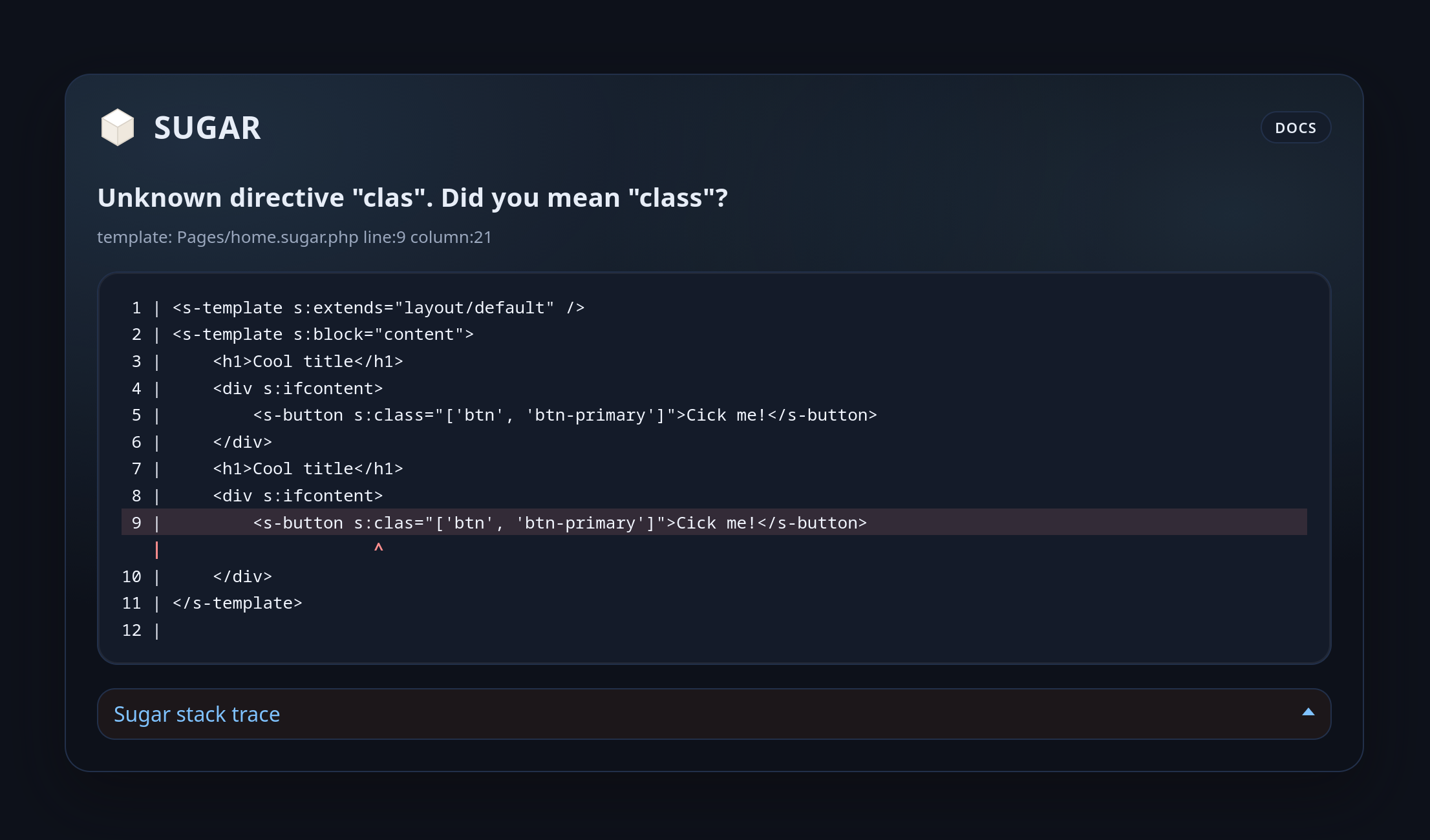
The renderer uses the template loader to fetch the source.
Consecutive identical stack frames are automatically collapsed in the rendered trace to reduce recursion noise.
use Sugar\Engine;
use Sugar\Exception\Renderer\HtmlTemplateExceptionRenderer;
use Sugar\Loader\FileTemplateLoader;
use Sugar\Config\SugarConfig;

$config = new SugarConfig();
$loader = new FileTemplateLoader(
	config: $config,
	templatePaths: [__DIR__ . '/templates'],
);

$engine = Engine::builder($config)
	->withTemplateLoader($loader)
	->withHtmlExceptionRenderer(includeStyles: true, wrapDocument: false)
	->withDebug(true)
	->build();
withHtmlExceptionRenderer() accepts the same rendering toggles as the renderer constructor:
includeStyles: Include inline CSS in the output.wrapDocument: Wrap the output in a full HTML document.
Use withExceptionRenderer() when you need custom renderer options:
use Sugar\Exception\Renderer\HtmlTemplateExceptionRenderer;

$renderer = new HtmlTemplateExceptionRenderer(
	loader: $loader,
	includeStyles: true,
	wrapDocument: false,
	traceMaxFrames: 20,
	traceIncludeArguments: false,
	traceArgumentMaxLength: 80,
	traceIncludeInternalFrames: false,
);includeStyles: Toggle the inline CSS theme. Set tofalseif you want to provide your own styles.wrapDocument: Wrap the output in a full HTML document (<!doctype html>,html,body). Useful when you return the renderer output directly as a response body.traceMaxFrames: Maximum number of stack frames shown (0means unlimited).traceIncludeArguments: Include function arguments in each trace frame.traceArgumentMaxLength: Max string length per rendered argument.traceIncludeInternalFrames: Include frames without file/line metadata.
TIP
Exception rendering only applies when debug mode is enabled and a CompilationException is thrown during rendering. In production, disable debug mode and handle exceptions with standard error pages.
Handling Exceptions
Catch SugarException to report template errors consistently:
use Sugar\Exception\SugarException;

try {
    echo $engine->render('pages/home', ['user' => $user]);
} catch (SugarException $exception) {
    $logger->error($exception->getMessage(), ['exception' => $exception]);
    echo 'Template error.';
}
WARNING
Avoid exposing exception details in production responses. Log them instead.
Debug Tips
- Enable debug mode while developing to improve diagnostics and cache refresh behavior.
- Install
nikic/php-parserto opt in to compile-time PHP syntax validation for earlier diagnostics. - Use
Engine::builder()->withDebug(true)->withPhpSyntaxValidation(true)to enable parser-based validation for a specific engine instance (see Optional PHP Syntax Validation). - When enabled in debug mode, Sugar validates output expressions individually and validates generated PHP as a whole, providing earlier syntax diagnostics with template location metadata.
- Without parser-based validation (or with debug disabled), invalid generated PHP is surfaced at include-time as a
CompilationExceptionwith compiled path and parse line information. - Check includes and component paths when you see missing template exceptions.
- Verify directive registration if you hit
UnknownDirectiveException.